Construction Kit
Designer's Handbook
THE MODULE EDITOR
A Designer's Handbook for the RetroRPG Engine
Designer's Handbookfor the RetroRPG Engine
Contents
- I.To the Designer
- II.Getting Started
- III.Settings, Words and Art
- IV.Painting a World Map
- V.Raising a Town
- VI.Digging a Dungeon
- VII.Linking the Maps Together
- VIII.People of the Realm
- IX.The Art of Conversation
- X.Portraits
- XI.Building Monsters
- XII.Weapons, Armor and Items
- XIII.Magic and Gadgets
- XIV.Events, Variables and Quests
- XV.The Generator
- XVI.Testing and Sharing
- XVII.Quick Reference Card
Chapter ITo the Designer
Every adventure the RetroRPG Engine plays is a module: a folder of plain text files that describes a world, its towns and dungeons, the people in them, the monsters that roam, the gear for sale, the magic that can be mixed and the story that ties it all together. The engine reads the module and plays it in the framed 320×200 style of the classic eight-bit role-playing games.
The RPG Module Editor is the workshop where modules are made. You never have to open the text files yourself. You paint maps with a tile palette, fill in forms, pick from drop-down lists, and the editor writes the files for you. It checks your work as you go, and with one click it starts the game on your module so you can walk through what you just built.
This handbook takes you through the whole craft, from a blank island to a finished adventure packed up for your friends. Read the first two chapters at the desk with the editor open; dip into the rest when you need them.
What a module is made of
You will rarely need to know this, but it helps to know where things live:
| File | What it holds |
|---|---|
| module.json | Title, author, theme, start position, starting party, character creation, endings |
| rules.json | Stats, levels and experience, party size, what happens when the party dies |
| classes.json | The callings a character can follow |
| tiles.json | Every kind of ground, wall, door and water |
| items.json | Weapons, armor, reagents, potions and special objects |
| spells.json | Magic (or gadgets, programs, tonics: the engine does not mind what you call it) |
| monsters.json | Everything that fights the party |
| arenas.json | The small 11×11 battlefields where fights happen |
| shops.json | Shops, inns, taverns, healers and stables |
| variables.json | Your own flags and counters for quests |
| maps/*.json | World and town maps, with their people, chests, entrances and events |
| dungeons/*.json | Dungeons: levels of corridors, and rooms where the fights are |
| pictures/*.png | Portraits and pictures shown in the game |
In the editor all of this appears as one module tree down the left side of the window.
Chapter IIGetting Started
The welcome page
Start the editor and the welcome page offers three ways in:
- Open module folder… opens a module you already have (any folder with a module.json in it).
- New module… starts a fresh module from a template.
- Generate adventure… starts from a template and lets the editor build a whole playable adventure on top of it (Chapter 15).
Modules you opened before are listed under Recent.
Your first module
Choose New module…. The dialog asks for four things:
- Template: the starting point. Each one brings a theme (tiles, sprites, frame, colors and music), a font, the right words for the setting, and a handful of classes, items and monsters.
- Title: the name players will see, such as The Lantern Isle.
- Id: the folder name. It is made from the title as you type; lowercase letters, digits and the underscore only.
- Folder…: where the module folder is created.
| Template | What you get |
|---|---|
| Fantasy | The default fantasy art and font: a fighter and a mage, torches, rats, wolves and goblins |
| Sci-fi colony world | Station art and sci-fi words: a marine and a psion, drones, crawlers, raiders |
| Modern spy thriller | City and casino art: agent, soldier, hacker and medic, guard dogs, thugs, henchmen |
| Post-apocalyptic wasteland | Scrap settlements: brawler, scavenger, tinker and doc, gadgets instead of spells |
| Frontier western | Prairie towns and mines: gunslinger, cowhand, doc and tonic peddler, tonics |
| Cyberpunk sprawl | Neon megacity: merc, hacker, street doc and nomad, programs instead of spells |
| Pirate isles | Islands and port towns: buccaneer, navigator, ship's surgeon and tide caller |
| Gothic horror | Moors and manors: hunter, occultist, physician and medium, rites |
| Steampunk empire | Brass and steam: brawler, engineer, surgeon and aeronaut, devices |
Every template is a small module that already plays: a 32×32 island with grass, forest, mountains and water, a party that can walk it, and monsters to meet. Everything in it is yours to change.
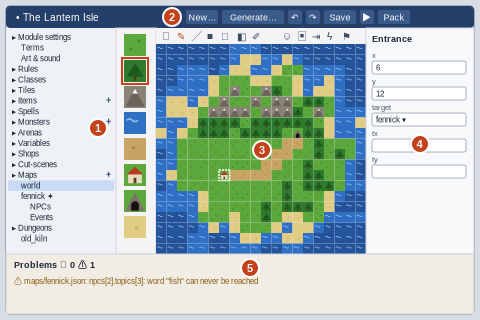
A tour of the window
- The module tree (left) lists everything in the module: Module settings (with Terms and Art & sound under it), Rules, then Classes, Tiles, Items, Spells, Monsters, Arenas, Variables, Shops, Cut-scenes, and finally Maps and Dungeons. Each map opens into its NPCs, Objects, Events and Entrances; each dungeon into its Rooms. The + beside a group adds a new entry; the ⋮ menu beside an entry offers Rename id…, Duplicate, Move up, Move down and Delete.
- The toolbar (top) holds New… (the creation wizards), Generate… (Chapter 15), Undo and Redo, Save, Play-test and Pack.
- The editing area (middle) shows the form of the entry you picked, or the map, dungeon, arena or cut-scene canvas.
- The inspector (right, beside a canvas) shows the form of whatever you clicked on the canvas. Drag its edge to make it wider.
- The Problems panel (bottom) lists errors and warnings. Click one to jump to the entry at fault.
Forms
Most of your work happens in forms. A field that names another thing (a sprite, an item, a map, a monster) is a drop-down list of the things that exist, with a filter box for long lists, so you cannot misspell an id. Lists have Add, Remove, Move up and Move down buttons. Fields that only make sense for some entries hide themselves: the damage field appears only when an item's kind is weapon. Every field has a short help line; hover over it when in doubt.
Saving and undoing
Every change can be undone with Ctrl+Z and redone with Ctrl+Y. One brush stroke on a map, one wizard or one generator run is one step. Ctrl+S saves; a dot before the title in the window bar means there are unsaved changes, and closing asks before throwing them away. Pictures and sounds you import (or remove) are written to the module folder at once: they need no Save, and Undo does not take them back.
Your first play-test
Press Play-test (▶). The editor saves, starts the game with your module and lets you create a character. Walk around, close the game, change something, press Play-test again. Do this often; nothing teaches like walking your own map.
Chapter IIISettings, Words and Art
Module settings
Module settings in the tree is the front page of your module:
- title, version, author and description: shown on the game's module list.
- theme: the built-in art set used for every tile, sprite, frame and tune your module does not supply itself. Change it and the whole world is redrawn.
- font: the screen font: classic, fantasy, scifi, wasteland, spy, frontier or cyber.
- Start position: the map and cell where a new game begins.
- Starting party: gold, food and items, and Companions who join after the created character.
- Character creation: pick (the player chooses a class) or questionnaire (the player answers questions and the answers decide the class and add stat bonuses); the intro paragraphs shown first; whether to ask male or female; the longest name.
- Music cues: the tune for the title screen, world, towns, dungeons, combat, sailing, victory and defeat.
- Intro cut-scene, titleScreen (the map shown behind the title) and endings: the victory and defeat screens, each with a title, paragraphs, music and an optional cut-scene.
Rules
Rules holds the stats (the first three show on the character sheet), the experience table and the highest level, HP gained per level, the largest party, how fast food is eaten, and what happens when the whole party falls: resurrect at a place you choose (losing some gold) or game_over. Under constants you can tune every number the engine uses, from the base hit chance to how long a torch burns. Leave them alone until a play-test tells you something feels wrong.
Terms: the engine's words
The engine has a few hundred built-in words and messages: the command names, Ship and Horse, gold, Mix, Cast, Reagents. On the Terms page you can rename any of them. A box shows each built-in text as a hint; type your own and the game uses it. The buttons Use sci-fi words, Use modern words, Use western words and the rest fill in a whole setting at once; Reset all clears them. Renaming a word never changes what a command does: a "shuttle" still sails.
Art & sound
The Art & sound page lists every picture and sound your module uses: tiles, class and monster sprites, NPC sprites, the party and vehicles, dungeon textures, the frame, the font, music and sound effects. Each shows a thumbnail, who uses it, and where it comes from: your module, the theme, the built-in set, or missing.
- Import… beside an entry replaces it with your own PNG (or MP3, OGG or WAV for sound). Tiles and sprites are 32×32; pick several images at once to make an animation.
- Remove deletes your file, and the theme's art is used again.
- Import pictures… adds PNG pictures (up to 256×128) for signs, letters, paintings and portraits.
- Make a portrait… opens the portrait maker (Chapter 10).
Chapter IVPainting a World Map
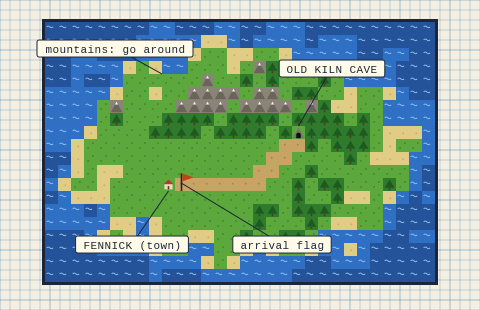
Making a map
Your template already has a world map called world. To make another, press + beside Maps in the tree. Give it an Id (which is also its file name), choose the Kind (world or town) and a Width and Height of up to 256 cells. The new map is added to the module's list of maps for you.
Click a map in the tree and it opens on the canvas, with the tile palette on the left and the map's settings in the inspector on the right.
The tools
| Key | Tool | What it does |
|---|---|---|
| V | Select / move | Click an NPC, chest, entrance, event or the arrival flag to edit it; drag to move it |
| B | Pencil | Paint the chosen tile; drag to paint a stroke |
| L | Line | Drag from one cell to another |
| R | Filled rectangle | Drag a box full of the tile |
| O | Rectangle outline | Drag a box with only its edges painted (town walls) |
| F | Fill | Flood the connected area of the same tile |
| I | Pick tile | Take the tile under the cursor (or right click with any tool) |
After the paint tools come the placing tools: Place NPC, Place object (chest), Place entrance, Place event (drag for an area) and Set arrival position. Zoom with + and − or Ctrl and the mouse wheel. Del deletes the selected thing. The Layers button hides overlays you do not want to see, and Resize map grows or shrinks the map; NPCs, chests and entrances move with the content.
Tiles
Every cell holds one tile. The palette shows the module's tiles with their art. A tile's form (under Tiles in the tree) decides how it behaves:
| Flag | Meaning |
|---|---|
| walk | The party can walk on it |
| sail | Ships can sail on it |
| swim | Swimming monsters can cross it |
| fly | A balloon (and flying monsters) can pass over it |
| horse | Riding ignores the tile's slowness |
| opaque | Blocks sight: what lies behind it is hidden |
| no_encounters | No random monsters appear on it |
Slow % is the chance a step onto it fails (forest, swamp). arena is the battlefield used when a fight starts on this tile. special gives it a job: door (opens when walked into; its opensTo is the open door tile), locked_door (needs a key), ladder_up and ladder_down, entrance (towns, caves), counter (talk across it to the shopkeeper behind), sign or portal. damage makes a tile hurt: poison, fire, sleep or energy.
World map settings
Click the map's name in the tree for its settings: name and the short displayName shown under the map frame; wrap (walking off one edge brings you back on the other, on by default for worlds); Line of sight (mountains and forests hide what is behind them); lit; music; the Arrival position; and the random monsters: Encounter % (the chance per turn that a monster appears) and encounters, a list of monsters that replaces the usual choice by terrain.
Chapter VRaising a Town
A town is a map of kind town. Make one with + beside Maps: 32×32 is a good village. Town maps do not wrap; walking off the edge takes the party back out to the world map, to the cell they entered from.
Laying it out
- Fill the whole map with grass or paving, then draw the outer wall with the rectangle outline.
- Draw each building with the outline tool in wall, fill its inside with floor_wood or floor_stone, and pencil in a door.
- Put a counter across the front of each shop, with the shopkeeper standing behind it: the party talks across counters.
- Mark where the party appears with Set arrival position (usually just inside the gate).
Floors marked no_encounters keep wandering monsters out of town.
Chests and objects
Place object (chest) drops a chest. In the inspector give it gold, a list of items, and if you like a trap (acid, poison, bomb or sleep). The same tool can place a parked ship, horse or balloon instead: change the object's type. Any object can have a Present only if condition, so a ship can wait in the harbor only after the shipwright has been paid (Chapter 14).
Shops, inns and healers
Use New… → New shop. Choose the kind:
| Kind | What it sells |
|---|---|
| weapons, armour, reagents | Items from its stock (item → price) |
| guild | Special supplies (torches, keys, gems) from its stock |
| food | Rations, priced per 25 |
| inn | A room for the night (heals the party, wakes sleepers) |
| healer | Cure, heal and resurrect, at your prices |
| tavern | A meal and a drink, and the keeper's gossip |
| stable | A horse |
The shop's name and its keeper's name each have a 🎲 for a random one that suits the kind of shop. The wizard fills the stock with every item of the right kind, and if you choose a map it also places the shopkeeper there. A shopkeeper is an ordinary NPC whose shop field names the shop: talking to them opens it. Edit prices under Shops afterward.
Signs
A sign is an event with the trigger look on the sign's cell, running a Show long text or a picture action. The player presses L and a direction to read it. Chapter 14 explains events.
Chapter VIDigging a Dungeon
Dungeons are different from maps. The party walks their corridors in a first-person view, one cell at a time, with walls on every side; fights happen in rooms, small 11×11 battlefields drawn with ordinary tiles.
Making a dungeon
Press + beside Dungeons. Give it an Id, a Size (4 to 32 cells square; 8 is classic) and a number of Levels (1 to 8). It is added to the module's list of dungeons.
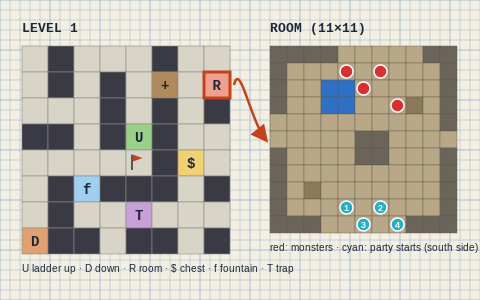
Levels
Each level is painted on a schematic: one flat color and a letter per cell. The level chips along the top switch levels; beside them you can add a level (empty, or a copy of the current one), move a level up or down, delete it, and change the dungeon's size. The paint tools are the same as on maps.
| Cell | What it is |
|---|---|
| wall, floor | The corridors. Levels wrap around at their edges |
| door, secret_door | A door; a secret one looks like wall until walked into |
| ladder_up, ladder_down, ladder_both | Climb between levels. A ladder up on level 1 leads out |
| room | A fight: stepping on it opens its room |
| chest | Gold (the amount is in Rules) |
| altar, orb | An altar (scenery); an orb that raises stats but hurts to touch |
| fountain_plain, _heal, _cure, _poison, _acid | Drink for good or ill |
| trap_pit, trap_rocks, trap_wind | Hidden traps |
| field_poison, _fire, _energy, _sleep | Magical fields that hurt as you cross |
A cell outlined in red is a mistake: a ladder leading into a wall, a ladder up on the last level, or a room cell without a room. Set where the party arrives with Set arrival (level 1).
Rooms
Painting a room cell creates its room. With the Select tool, click the room cell to open it (press Esc or ← Level to go back). A new room has walls with an opening on each side. In the room:
- paint it with the module's own tiles, as you would a town;
- Place monster drops a monster from the drop-down; drag to move it;
- Party start marks where the party stands when it comes in. Starts are kept per side (north, east, south, west, or any): the party entering from the north stands at the north starts. Numbers give the member order;
- Place step event puts an event on a room cell (a treasure on a plinth, a lever).
Dungeon settings
Click the dungeon's name for name, music, Encounter % and the encounters list for the corridors, the arena used for corridor fights, and textures: a prefix that picks a texture set, so ice_ walls can give one dungeon a frozen look.
Arenas
Every fight happens on an arena: 11×11 tiles with the party's starting places (cyan) and the monsters' (red). Tiles name their arena, dungeons name one for corridors, and rooms are their own arena. Under Arenas, paint them like any map; Default and Clear reset the start lists.
Chapter VIILinking the Maps Together
A module is a web of places. These are the threads that tie them.
Entrances
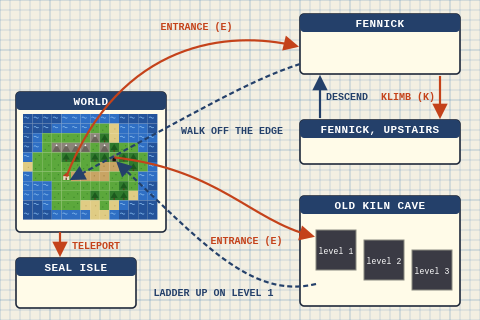
An entrance is a cell where E (Enter) takes the party somewhere. Choose Place entrance on the world map and click the town's tile. In the inspector pick its target: any map or dungeon. Leave tx and ty empty to arrive at the target's arrival position, or fill them in to arrive somewhere else.
Paint the cell with a tile whose special is entrance (the template's town and dungeon_entrance) so players can see it is a way in. Entrances work on any map: a cellar door in a town can lead into a dungeon, a cave on the world map can lead to a second world underground.
Coming back out
- From a town, walking off any edge returns the party to the cell they entered from. To send them somewhere else instead, fill in the town's Leaving the edge goes to setting.
- From a dungeon, the ladder up on level 1 (or the xit spell) returns them to the entrance.
Stairs between floors
A building with an upper floor is two town maps. On each staircase cell put an event with the trigger klimb (on the ground floor) or descend (upstairs) and a Teleport party action to the matching cell of the other map. The player presses K or D to use them.
Teleports, portals and sealed doors
- A step event with a Teleport party action is a portal, a trapdoor or a boat ride.
- A gate spell (Chapter 13) sends the party to a fixed place.
- A sealed entrance is a cell painted with a tile the party cannot walk on (rubble, a barred gate). A use_item event with the key turns it into the entrance tile with Change a map tile.
- A Park a new vehicle action leaves a ship, horse or balloon at a cell: the reward of a shipwright.
Chapter VIIIPeople of the Realm
The New NPC wizard
Choose New… → New NPC, or + beside a map's NPCs, or the Place NPC tool on the canvas. The wizard asks for the map, a name (press its 🎲 for a random one in your module's setting), the role and a position:
| Role | What it makes |
|---|---|
| townsfolk | Someone to talk to |
| shopkeeper | Talking opens the shop you choose |
| recruit | Someone who can join the party, as the class you choose |
| hostile | Attacks on sight, fighting as the monster you choose |
| guard | Peaceful, but turns on the party if they attack someone in town |
The wizard picks a fitting sprite (or choose your own), and writes a first greeting and job.
The NPC form
- name (with a 🎲 for a random one), pronoun (he, she, they or it) and sprite.
- x and y: where they stand (or drag them with the Select tool).
- movement: fixed (stays put), wander (strolls nearby), follow (trails the party) or hostile (hunts the party).
- look: what the player sees, as in "You see a weathered fisherwoman."
- greeting, job, health, topics, unknown and bye: the conversation (Chapter 9).
- Turn away %: the chance they refuse to talk at all.
- shop, joinClass, monster and guard: the jobs from the wizard's roles.
- Present only if: a condition. The NPC is only on the map while it is true, so a prisoner can vanish from the cell once freed and appear at home.
Chapter IXThe Art of Conversation
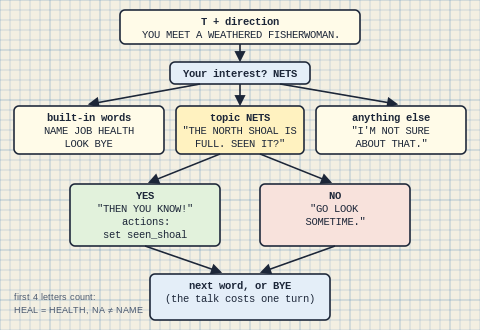
Conversations work the way they did in the classic games. The player presses T and a direction, reads who they meet, and types a word. The person answers if they know the word.
Built-in words
Every person already understands:
| Word | Answer |
|---|---|
| NAME | "I am …" with their name |
| JOB | Their job text |
| HEALTH | Their health text (default "I'm feeling fine.") |
| LOOK | "You see …" with their look |
| BYE (or Enter alone) | Their bye text, and the talk ends |
Anything they do not know gets the unknown text. Only the first four letters count: HEAL matches HEALTH, and so does HEALTHY, but NA does not match NAME.
Topics
Under topics press Add. Each topic has:
- words: one or more words that bring it up (nets, fish);
- text: the answer;
- Only if: a condition; the topic is skipped while it is false;
- once: answered only one time per game (a once topic with a yes/no question must be answered: Esc asks again);
- Save id: optional; give once topics a short unique name so saved games still know they were used after you add or reorder topics;
- actions: what happens after the answer (give an item, set a variable, start a fight);
- Yes/no question: the player must answer Y or N, and each branch has its own text and actions.
Topics are checked from the top, so put the special cases first: the topic that only works if the quest is done must come before the plain one with the same word. The Problems panel warns you about a topic that can never be reached.
Writing good talk
The job line is a signpost. End it with the words you want the player to ask about, set in capitals: "I MEND NETS AND WATCH THE SHOAL." The player will try NETS and SHOAL. Every answer can hand on one more word, so a chain of townsfolk leads the player across the map. Keep lines short: the message scroll is narrow, and the engine shows speech in capitals unless you switch that off in the module settings.
People can greet the hero by name: "Hail, {sir} {name}!" becomes Hail, madam Ivy! for a heroine called Ivy. These text tokens work in every line an NPC speaks; Chapter 14 lists them all.
Chapter XPortraits
A portrait is a 120×64 picture of a person. In the game it appears over the party roster while that person speaks in a cut-scene, and any picture can be shown with the Show long text or a picture action: a wanted poster, a painting in a gallery, the face of the person who wrote a letter.
You can import your own PNG on the Art & sound page, or let the editor draw one.
The portrait maker
Open it with Generate… → Portrait… or Make a portrait… on the Art & sound page.
- For (optional): pick an NPC. Their look and job fill in the description, and the picture id becomes their id followed by _portrait.
- Description: describe the person in plain words: an old smith with a grey beard in a forge. Press Read it. The editor fills in the pickers from the words it understood, and lists the ones it did not, so you can say it another way.
- The pickers let you set anything by hand: Who (race, age, sex, skin, expression), Hair and headwear, Clothes and things held (up to two), Marks (scars, an eye patch, a monocle, a cyber eye) and Where (the backdrop, and at night). A picker left on any is decided by the seed; All to "any" clears them.
- Setting style picks which theme's clothes and backdrops are likely; it starts as your module's theme.
- Seed and the 🎲 button: the same seed and choices always give the same face. Roll the die until you like what you see; changing one picker never reshuffles the others.
- Save picture writes it to the module's pictures.
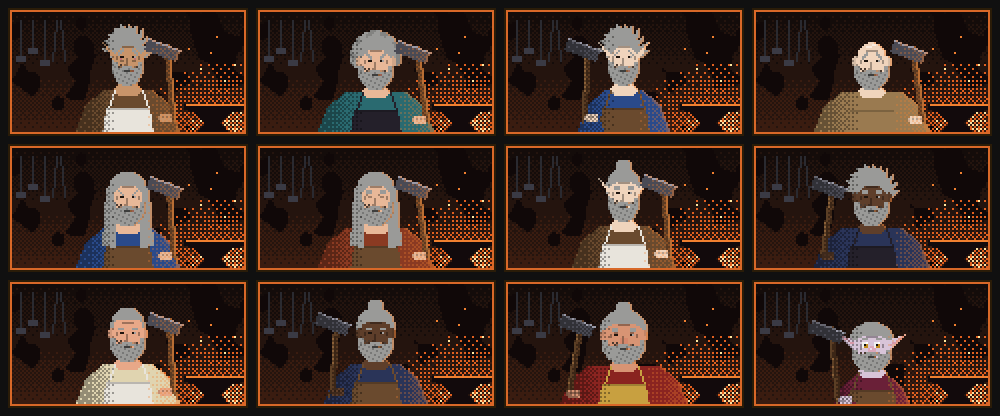
Words the maker knows include roles (smith, sheriff, hacker, captain, vampire hunter), which suggest clothes, a prop and a setting; colors next to a feature (a red braided beard, a blue coat); ages and sexes (old woman, boy); expressions (grinning, stern); and places (in a forge, on a ship's deck, at night). It matches words, not sentences: "not wearing a hat" still reads as a hat.
A generated picture is marked ✦ on the Art & sound page; Edit portrait… reopens the maker with its description and choices. The editor never replaces a picture you imported, or changed since, without asking.
Chapter XIBuilding Monsters
The New monster wizard
New… → New monster asks for a name, a sprite and a strength, and on which terrains it turns up. The strength fills in sensible numbers you can tune later:
| Strength | HP | Damage | Hit % | Defense | XP | Gold | Group |
|---|---|---|---|---|---|---|---|
| weak | 6–12 | 1–4 | 40 | 0 | 3 | 0–5 | 2–4 |
| average | 15–25 | 2–8 | 50 | 0 | 8 | 5–20 | 1–4 |
| strong | 30–50 | 4–12 | 60 | 2 | 20 | 10–40 | 1–3 |
| boss | 80–120 | 8–20 | 70 | 4 | 100 | 50–150 | 1 |
The monster form
- HP, damage, gold and group are ranges: a low and a high number, rolled each time.
- XP: experience shared by the party for the kill.
- Hit % and defense: how often it hits, and how hard it is to hit.
- terrains: the tiles it wanders out of at random (any for all). Leave it empty for monsters that only appear where you put them: in rooms, in a map's encounter list, or by a Start a fight action.
- minTurn: it will not appear at random before this turn, so the dangerous ones wait.
- rangedEffect: what its shots do, for monsters with the ranged flag: fire, cannon, magic, sleep or poison, or a field it leaves behind.
Flags
| Flag | Effect |
|---|---|
| ranged, magic | Shoots from a distance; casts |
| poison, sleep | Its hits can poison, or put to sleep |
| swims, sails, flies | Moves over water, sails like a ship, flies over anything |
| immobile | Never moves |
| teleports, hides | Blinks around the arena; invisible until it attacks or is hit |
| undead | Can be turned back by the repel_undead magic |
| steals_gold, steals_food | Robs the party |
| regenerates | Heals every round |
| peaceful | Will not start a fight |
| boss | Cannot be put to sleep, killed outright or turned away |
Chapter XIIWeapons, Armor and Items
Everything the party can carry is an item. Add one with + beside Items, then pick its kind. The form changes to show only the fields that kind needs. (The data spells the armor kind armour; the game shows the word you choose on the Terms page.)
| Kind | Fields | Notes |
|---|---|---|
| weapon | damage, range, consumed, alwaysHits | range above 1 shoots across the arena; consumed is used up when thrown (oil flasks) |
| armour | defense | Lowers the foes' chance to hit |
| reagent | Ingredients for magic and gadgets (Chapter 13) | |
| consumable | effect, Use actions | Torches, keys, potions, rations |
| special | effect, Use actions | Quest objects: a letter, a crystal, a deed |
Every item has an id, a name, an optional short name for tight lists, and a price (what shops charge; they buy back at half).
Who may use what
A class's form lists the weapons and armour it may use (\* means all of them) and its startWeapon and startArmour. A mage who cannot wear plate is the oldest rule in the book.
Built-in effects
Three effect words give an item an engine job:
| Effect | Used by | Example |
|---|---|---|
| light | Ignite (I) in a dungeon | Torch |
| view | Peer at a gem: the overview map | Gem, old road map |
| unlock | Jimmy (J) a locked door | Key, crowbar |
Use actions
Any consumable or special item can have Use actions: what happens when the player presses U and names it. A healing draught takes itself, heals 40, plays a sound and shows a message. A letter shows its text with Show long text or a picture and is not taken, so it can be read again. If the item should only work in one place, use a use_item event on that map instead (Chapter 14): the event wins when the party stands there.
Selling it
Give the item a price and add it to a shop's stock with the price that shop asks. Weapon shops only stock weapons, armor shops armor, reagent shops reagents; the guild sells anything else.
Chapter XIIIMagic and Gadgets
Magic in the RetroRPG Engine is mixed before it is cast. The player buys reagents, uses Mix to combine them into a number of mixtures of a spell, and Cast spends one mixture and some MP. The same machinery serves any setting: rename the words on the Terms page and spells become gadgets, programs, tonics, rites or devices. The post-apocalyptic template's Arc Zapper is built from copper wire and a battery cell exactly the way a fireball is built from ash and sulfur.
Who has magic
A class's Magic points set its MP: a stat times a multiplier (the template's mage has twice their INT; the fighter none). MP comes back slowly as the party walks.
Making a spell
Add one with + beside Spells:
- name, and a letter: the key the player presses to cast it. Each spell needs its own letter.
- MP: the cost per cast.
- reagents: the exact recipe. Mixing anything else fails and wastes the reagents.
- effect: what it does (below), and power: how much (0 uses the default).
- target: none, direction (asks which way) or player (asks who).
- where: world, town, dungeon, combat; none ticked means anywhere the effect fits.
- Gate target: for the gate effect, the map and cell it sends the party to.
| Effect | What it does |
|---|---|
| heal, heal_all | Restores HP to one member, or to everyone |
| cure, awaken, resurrect | Cures poison, wakes a sleeper, raises the dead |
| light | Lights a dungeon for a while |
| damage, damage_all | A bolt at the first foe in a direction; or hits every foe |
| kill, sleep_all | Slays a foe outright; puts foes to sleep (never a boss) |
| repel_undead | Undead flee |
| negate, protect, quick | Foes cannot cast or blink; better armor; extra turns, for the fight |
| dispel, open | Removes a field; opens a door or a locked door |
| blink, gate, wind | Jumps a few cells; travels to the gate target; sets the wind |
| view | The overview map |
| ascend, descend, xit | Up or down a dungeon level; out of the dungeon |
A worked example
A healing gadget for a wasteland module: name Auto-Mender, letter M, 8 MP, reagents Chem Vial and Battery Cell, effect heal, power 40, target player. Stock chem vials and battery cells at the scrap trader, and teach the recipe through a townsperson's topic: MENDER: "CHEMS AND A CELL, KID. MIX THEM RIGHT OR YOU'LL LOSE BOTH." Players should have to learn recipes; that is half the fun.
Chapter XIVEvents, Variables and Quests
Events
An event makes something happen on a map. Make one with New… → New event, + beside a map's Events, or drag an area with Place event. Each event has a trigger:
| Trigger | Fires when |
|---|---|
| step | The party walks onto the area |
| search | The player presses S there |
| look | The player looks (L) at the area from beside it: signs, plaques, bookshelves |
| use_item | The player uses the chosen item there |
| enter | The party arrives on this map |
| turn | Every turn, anywhere on the map |
| klimb, descend | K or D on the area: stairs between floors |
An event also has an optional Only if condition, once (it fires only the first time) and its actions. In a dungeon, events go on room cells (Chapter 6). Give a once event (and a chest object) a Save id — a short name, unique in its list — and saved games keep track of it even after you add or move events and objects in a later version of your adventure.
Actions
Topics, events, items and cut-scenes all run actions from the same list. Press Add to pick one:
| Action | Does |
|---|---|
| Show message | A line in the message scroll |
| Show long text or a picture | A window with a title, a picture and pages of text |
| Set variable; Add to gold/food/variable | Changes the story's state |
| Give item; Take item; Give experience | Rewards and payments |
| Heal; Cure; Level up | Looks after the party |
| NPC joins the party; Companion leaves the party; Remove NPC | Companions (a level number or leader makes a recruit as strong as the party); a companion going home; people who leave (tick forever to keep them gone for the rest of the game) |
| Teleport party; Change a map tile | Moves the party (also into a dungeon); opens walls, seals doors (maps only) |
| Park a new vehicle | Leaves a ship, horse or balloon |
| Start a fight; Open a shop | Combat; trade |
| Play a cut-scene; Play sound; Change music | Presentation |
| End the game | Victory or defeat |
| If … then … else | Choose actions by a condition |
The Add menu also has presets, ready-made groups you just fill in: Reward: message + gold + XP; Hand over an item; Quest step: set variable + message; Ambush: message + fight; Open a passage: message + change a tile; Only if the party has an item….
Variables and conditions
Variables (in the tree, or New… → New variable) remember the story: a number (int), a yes/no (bool) or a text (string). Conditions test them. Press the Build a condition… button beside any condition field and pick the tests from drop-downs, or type them:
| Condition | True when |
|---|---|
| quest_ferry >= 2 | A variable is 2 or more |
| has_item("brass_key") | The party carries the item |
| count_item("pearl") >= 3 | The party carries three or more |
| gold >= 100 | The party has the money |
| in_party("tamsin") | That companion is with the party |
| visited("old_kiln") | The party has been to that map |
| party_size < 4 | There is room for one more |
| rand(100) < 25 | One time in four |
Join tests with && (and) and || (or); put ! in front of a test to turn it around.
Text tokens
Text can speak to the player by name. Write a token, a word in braces, and the game puts in the right words when the text is shown. Tokens work wherever the player reads your words:
- what NPCs say: their look, greeting, job, health, unknown and bye, every topic's text and the answers to its yes/no question (Chapter 9);
- Show message actions (a line in the message scroll);
- Show long text or a picture actions, in the title and in the text;
- the Say steps of cut-scenes (Chapter 16).
| Write | The player sees |
|---|---|
| {name} | The party leader's name |
| {name2} … {name8} | That party member's name (nothing if the party is smaller) |
| {class} | The leader's class |
| {he} {him} {his} {himself} | he / she, him / her, his / her, himself / herself |
| {man} {sir} {lad} | man / woman, sir / madam, lad / lass |
| {var:quest_ferry} | The value of a variable (nothing if it has none) |
| {var:gold} {var:food} {var:level} | The party's gold, food, or the leader's level |
The words in the fourth and fifth rows follow the party leader's sex, chosen when the hero is made. If your module does not ask, the leader counts as male. Write a capital to get one: {He} gives He or She, {Sir} gives Sir or Madam, and {HE} gives HE or SHE.
So a letter read with Show long text might say: "Dear {name}, the ferryman owes you {var:ferry_debt} gold. Come to the docks yourself, good {sir}; he will not dare refuse a {class} to {his} face."
A word in braces the game does not know is shown just as you wrote it, and {var:…} naming a variable you have not made shows nothing; the Problems panel warns you about both. If your module shows NPC speech in capitals, the filled-in words are in capitals too. (Shop greetings do not fill tokens.)
The quest wizard
New… → New quest builds a whole errand at once. Name the quest, pick the Quest giver and the keyword the player asks about, write the offer, choose an Item to bring (or none), the reminder, the Reward text and the reward (gold, XP, an item) and what they say Afterwards. The wizard makes a variable (0 not started, 1 started, 2 done, 3 rewarded) and four topics on the giver, in the right order. Without an item to bring, set the variable to 2 yourself with an event or another topic when the deed is done.
Chapter XVThe Generator
The editor can build for you: a whole adventure from a theme, a single town or dungeon for your own world, or the missing pieces of an adventure you started. It uses no outside service; everything is made from the editor's own name lists, phrase books and map makers.
Seeds
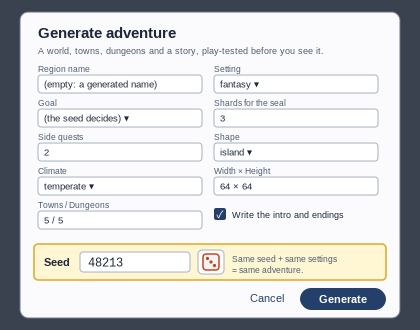
Every generator dialog has a Seed field with a 🎲 button. The seed decides every random choice: the same seed with the same settings gives the same result, every time. Write down a seed you like. Press 🎲 for a new one.
What it can make
Open Generate… in the toolbar:
- Adventure…: a world, its towns and dungeons, and a story: a quest giver in the first town, a goal (defeat a villain, recover a relic or rescue a captive, or let the seed decide), shards that must be gathered to break a seal on the last dungeon, side quests, and if you tick Write the intro and endings, the opening text and the victory and defeat screens. The editor then plays it: a robot party walks the whole story on the real engine, and if it gets stuck the next seed is tried. The welcome page's Generate adventure… does all this on a brand-new module.
- Finish my adventure…: looks at your module and lists what is missing: no world, entrances that lead nowhere, towns no one can reach, dungeons without levels, towns without people, people with nothing to say, no ending. Tick what to fill. To join the story to yours, mark your own Quest giver, Goal item, Goal variable, Goal site and which of your sites hold which items; the generator builds only the missing steps between.
- World…: terrain (island, continent or archipelago; temperate, arid or wet), towns joined by roads, and dungeons, each with its generated town or dungeon behind the entrance.
- Town…: a hamlet, village, town or city of a chosen Wealth (1 to 5), with the services you tick, townsfolk, and an entrance on a map if you give one.
- Dungeon…: a cave, crypt, ruin, tower, mine, temple, fort, lair, lab, bunker, sewer or wreck, of size 8 or 16, with levels, Danger (1 to 5), rooms per level and a boss.
- Townsfolk…: more people for a town you made, with jobs, looks and things to say.
- Portrait…: the portrait maker (Chapter 10).
- Names…: a browser of names for people, towns, regions, sites, shops and taverns in every setting. Click a name to copy it.
Name boxes also have a 🎲 of their own: NPC, companion and cut-scene actor names (people), shop names (by the shop's kind), map names (a town, or a region for a world map), dungeon names (by the dungeon's kind), the shop keeper in New shop, and the name boxes of the generators. Press it for one random name in your module's setting (in a generator, its Setting); press again for another.
The Setting field picks the style of names and talk: fantasy, sci-fi, modern, post-apocalyptic, western, cyberpunk, pirate, horror or steampunk. It starts as your module's theme.
Your work is safe
Generated content is marked with ✦ in the tree, and its form shows a banner with the tool, the seed and the date. Regenerate… on a generated world, town, dungeon or adventure reopens the generator with the same settings: try a new seed, or change a setting. Anything you have edited since counts as yours: the ✦ turns gray, and the generator keeps it and tells you so. The generator never overwrites something you made by hand unless you tick Replace. And every run is one step of Undo.
Chapter XVITesting and Sharing
Play-test often
Play-test saves and starts the game on your module. Keep the Problems panel at zero errors, and walk every link, read every sign, ask every person their job. Try to break things: walk into the dungeon without the key, sell the quest item, let the whole party die. Players will.
Cut-scenes
Under Cut-scenes you can script short scenes: actors walk, speak with portraits, music changes, and when the scene ends its Then actions run. The scene editor shows the stage as it stands before the step chosen on its slider; click squares to plan walks. Play in the game plays just that scene. Use a cut-scene as the Intro, before an ending, or from any action list.
Every step has an Only if condition (the same conditions as Chapter 14). Leave it empty and the step always plays; fill it in and the step is skipped while the condition is false. So Mara can say "You found it!" only if `has_item("brass_key")`, and "Still looking?" only if `!has_item("brass_key")`. Conditions see the game as it was when the scene began, because steps change nothing; put real changes in Then.
A Say text can greet the player by name with text tokens such as {name} and {he} (see Text tokens in Chapter 14).
Renaming
Rename id… in an entry's ⋮ menu changes an id everywhere it is used: every map, topic, shop and action that names it. Map and dungeon files are renamed with it.
Packing
Pack saves, checks the module, and writes one file, <id>-<version>.zip, wherever you choose. It refuses while there are errors. Players open the zip from the game's Modules page, on Windows, Android or the web. Raise the version in Module settings each time you share a new one.
Chapter XVIIQuick Reference Card
Everywhere
| Key | Does |
|---|---|
| Ctrl+S | Save |
| Ctrl+Z | Undo |
| Ctrl+Y | Redo (also Ctrl+Shift+Z) |
On a map, dungeon or arena canvas
| Key | Tool |
|---|---|
| V | Select / move |
| B | Pencil |
| L | Line |
| R | Filled rectangle |
| O | Rectangle outline |
| F | Fill |
| I | Pick tile (or right click) |
| + − | Zoom (or Ctrl + wheel) |
| Del | Delete the selected thing |
| Esc | Leave a dungeon room |
Toolbar
| Button | Does |
|---|---|
| New… | Wizards: NPC, monster, shop, event, quest, variable |
| Generate… | Adventure, Finish my adventure, World, Town, Dungeon, Townsfolk, Portrait, Names |
| ▶ Play-test | Save and play the module |
| Pack | Save as a module package (.zip) |
Sizes
| Thing | Size |
|---|---|
| World or town map | Up to 256×256 cells |
| Dungeon level | 4 to 32 cells square, 1 to 8 levels |
| Room, arena | 11×11 |
| Tile, sprite | 32×32 PNG |
| Picture | Up to 256×128 PNG |
| Portrait | 120×64 PNG |
The order of building
- New module from a template; play-test it at once.
- Paint the world; add a town and an entrance to it.
- People the town; give the first one a job that names a word.
- Dig a dungeon with a room, a monster and a chest; link it.
- A quest: a variable, a giver, an item, a reward.
- An ending. Then play it through from the start.
Every world worth exploring was once an empty grid. Fill yours.
THE MODULE EDITOR, a designer's handbook for the RetroRPG Engine. Every example name, place and line of talk in this book is original.
Design Notes
THE MODULE EDITOR
Paint a world. Raise its towns. Dig its dungeons. Give its people something to say.
Then hand it to a friend and watch them play.
RetroRPG EngineWeb · Windows · Android